Table of contents
Open Table of contents
The Story
Like I mentioned in my previous post, I’d been wanting to delve deeper into AI for a while now. Then I felt the time had come. One morning, while browsing Humble Bundle, I saw a new bundle. It was from The Pragmatic Programmers. I was in the middle of reading their “The Pragmatic Programmer, 20th Anniversary Edition” and found it to be a wonderful book! I’d read other publishers — No Starch Press, O’Reilly and so on — each with their own AI-topic books, but I found myself instantly intrigued by one book in the aforementioned bundle: “Process Over Magic: Beyond Vibe Coding”. The name, the very recent release date, the short length, my liking of this publisher, wanting to learn AI, having some free time — the stars had aligned and I got the bundle. I started reading immediately, and I’ll walk you through my journey with it in this post.
Vibe Coding a Game
Part 1 - The First Prompt
You: "Can you write a game like Jewel Shuffle in Python using pygame...?"
  |
  v
AI writes the whole game in one response --> you run it --> it works
Now that I had the new setup, I began. I set aside my workflow and lessons I’d learned before and just followed the examples, exactly as the author intended.
First, we began with vibe coding a game in Python. The prompt was simple enough:
Can you write a game like Jewel Shuffle in Python using pygame for my daughter? Please make it cute and playable with mouse!
This was the first response:
- That sounds like a wonderful project! I'll create a cute and playable **Jewel Shuffle** game using Python and Pygame. The game will feature:
- A grid of colorful jewels that can be swapped with adjacent jewels.
- Match-3 mechanics (or more) to clear jewels and score points.
- Cute graphics and sound effects.
- Mouse-only controls for easy play.

---

- ### Plan
  1.  **Setup**: Install Pygame and create the project structure.
  2.  **Game Logic**: Implement the core mechanics (jewel grid, swapping, matching, and scoring).
  3.  **Graphics**: Design cute jewels and a simple UI.
  4.  **Sound Effects**: Add optional sound effects for matches and swaps.
  5.  **Polish**: Add animations, feedback, and a scoring system.

---

- ### Step 1: Setup

  First, let's create the project structure and install Pygame.

  Now, let's create a `main.py` file to start coding the game.

---

- ### Step 2: Create a `sounds` Directory (Optional)
  Let's create a directory for sound effects. You can add your own `.wav` files later if you'd like.

---

- ### Step 3: Run the Game

  Let's test the game to see if it works!

  It seems I need to install Pygame first. Let's do that:

  It looks like the terminal tool is having trouble with the combined command. Let's install Pygame first, then run the game:

  It looks like you're on a Linux system with a managed Python environment. Let's create a virtual environment to install Pygame:

  Let's break this into smaller steps. First, create the virtual environment:

  It seems the terminal tool is having trouble with multi-step commands. Let's try running the game directly and see if Pygame is already installed:

  Let's try running the game from the project root:

  It seems the terminal tool is not cooperating. Let's try a different approach. I'll provide the complete code, and you can run it locally:

---

- ### How to Run the Game Locally
  1.  **Install Pygame**:
  - Open a terminal and run:
    ```bash
    pip install pygame
    ```
  - If you're on Linux and get an error about an "externally managed environment," create a virtual environment first:

    ```bash
    python3 -m venv venv
    source venv/bin/activate
    pip install pygame
    ```

    2. **Save the Code**:

  - Copy the code from `main.py` above into a file named `jewel_shuffle/main.py` in your project directory.

    3. **Run the Game**:

  - Navigate to the `jewel_shuffle` directory and run:
    ```bash
    python main.py
    ```

---

- ### Game Features
- **Cute Jewels**: Colorful jewels with a simple, playful design.
- **Mouse Controls**: Click to select and swap jewels.
- **Scoring**: Earn points for matches (10 points per jewel).
- **Gravity**: Jewels fall into place after matches.

---

- ### Next Steps
  If you'd like, I can add:
  1.  **Animations**: Smoother jewel movements and explosions for matches.
  2.  **Sound Effects**: Add cute sounds for swaps and matches.
  3.  **Levels**: Increase difficulty as the score rises.
4. **Power-Ups**: Special jewels that clear rows or columns.After the code was done and the packages were installed, I manually launched the game. Here is what it looked like:
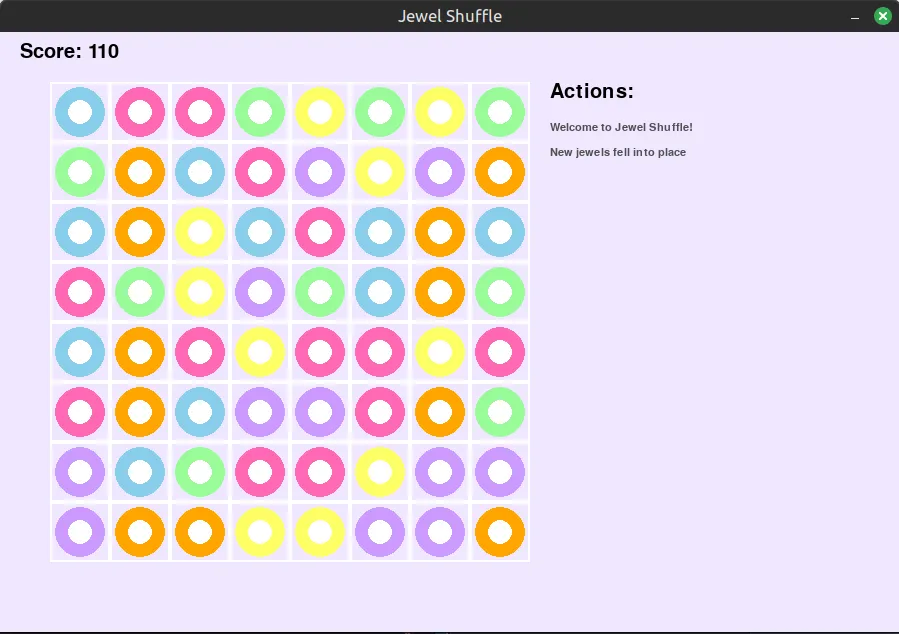
The “Actions” came later, but I don’t have an earlier screenshot.
So, did it work?
The game could be used with a mouse and the logic worked! Line them up and they would collapse, bringing in new jewels.
Part 2 - The Refactoring
You: "Find the issue and fix it."
  |
  v
AI: *fixes something* --> still broken
  |
  v
You: "Fix it again" --> AI: *fixes something else* --> still broken
  |
  ...and so on, a few loops
The game worked fine for 3-4 turns and then became unresponsive. Just as the book suggested, I asked Mistral to “Find the issue and fix it”.
So there was a second step — the flow changed a bit:
You --> AI: "fix it" --> still broken
  |
  v
You: "add an 'Actions' log so we can see where it stalls"
  |
  v
You + AI go through the logic together --> found it --> AI fixes it quickly
That’s when I asked it to add an “Actions” list — basically a print on every action, tracked on the right side, so I could narrow down where the issue was.
Thankfully I knew a bit of Python, plus it is easy enough to read. It turned out that when jewels matched and the grid shifted, some new jewels ended up outside the grid, invisible. The game logic waited for them to land before accepting new clicks — so the game just stalled.
Once we realized that, the AI fixed it in no time.
Conclusion
90% magic, 10% process — and that 10% is exactly what the book was about.
Here you can see the result for yourselves - link.